How to add the weather to your calendar
Google Calendar and the iPhone calendar do not show a weather forecast on their own. With a calendar subscription you get the 10-day forecast of the Deutscher Wetterdienst (DWD), Germany’s national weather service, as all-day events, one per day. The calendar updates itself. It works for any place in Germany.
Step 1: Create the link for your place
Enter your town or postcode. The page often detects your place by itself.
Google Calendar
Google Calendar does not show the weather by itself. With the subscription you see the forecast on your computer, on Android and on the iPhone.
Fastest way
- Create the link for your place in step 1 above.
- On your computer, click Google Calendar. Google then asks if you want to add the calendar.
- Click Add. Done.
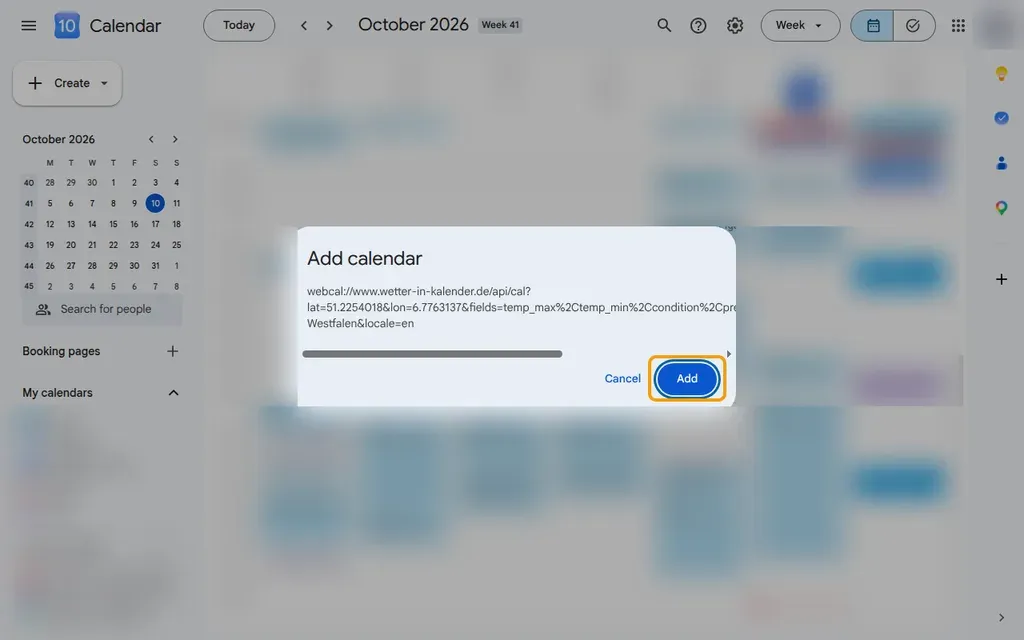
By hand with a direct link
- Copy your link in step 1 above with the Copy link button.
- On your computer, open Google’s page for adding a calendar by URL.
- Paste the link into URL of calendar and click Add calendar.
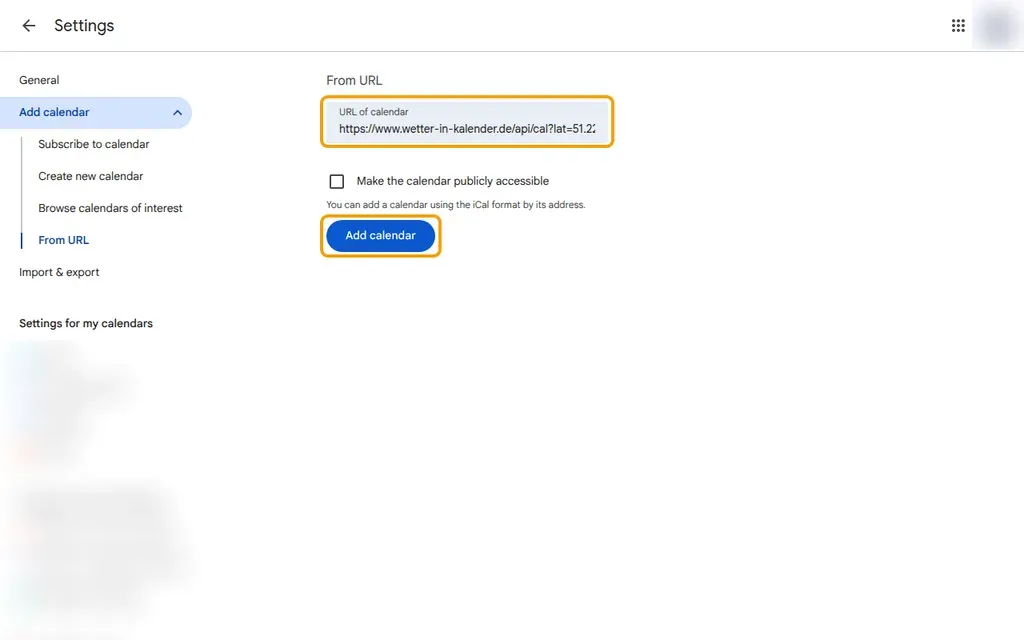
By hand through the menu
- Copy your link in step 1 above with the Copy link button.
- Open calendar.google.com in the browser on your computer. If the left column is missing, click the menu icon ☰ at the top left.
- In the left column, click the plus icon next to Other calendars and choose From URL.
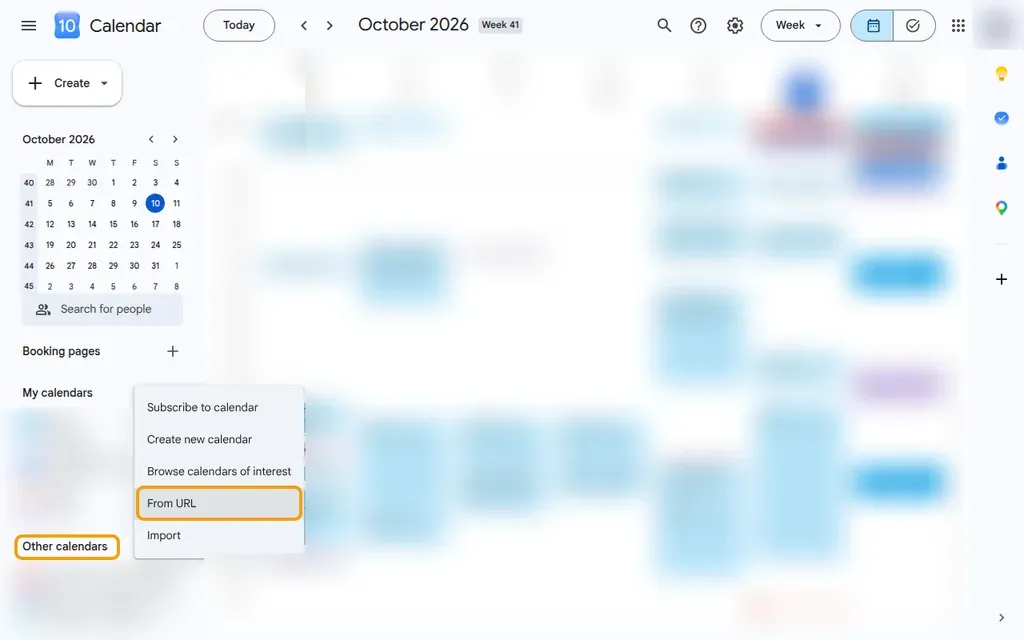
- Paste the link into URL of calendar and click Add calendar.
- 💡 You can only subscribe in the web version of Google Calendar. The Android and iPhone apps cannot add a calendar by URL. After you subscribe, the weather calendar appears in the apps by itself.
- 💡 Google refreshes subscribed calendars on its own schedule, often only every 8 to 24 hours. There is no refresh button.
iPhone & iPad
The calendar on the iPhone and iPad does not show the weather. If you save the subscription in iCloud, you also see it on your Mac.
Fastest way
- Open this page in Safari on your iPhone or iPad.
- Create the link for your place in step 1 above.
- Tap Open in calendar app and confirm the subscription.
By hand (iOS 26)
- Copy your link in step 1 above with the Copy link button.
- Open the Calendar app and tap the calendars button at the bottom.
- Add a new calendar and choose the subscription calendar there.
- Paste the link and start the search.
- Choose iCloud as the location, so the calendar also appears on your other devices. Save the subscription.
- 💡 Apple also explains subscriptions on its support page.
Mac
Apple Calendar
- Copy your link in step 1 above with the Copy link button.
- Open the Calendar app and, in the File menu, choose the item for a new calendar subscription.
- Paste the link and confirm.
- Let the calendar refresh automatically every hour and choose iCloud as the location. Confirm with OK.
- 💡 If you already saved the subscription in iCloud on your iPhone, it is already on your Mac.
Outlook
With the subscription you see the 10-day forecast in Outlook right next to your appointments.
New Outlook and Outlook on the web
- Copy your link in step 1 above with the Copy link button.
- Open the calendar in Outlook. In the browser you find it at outlook.com.
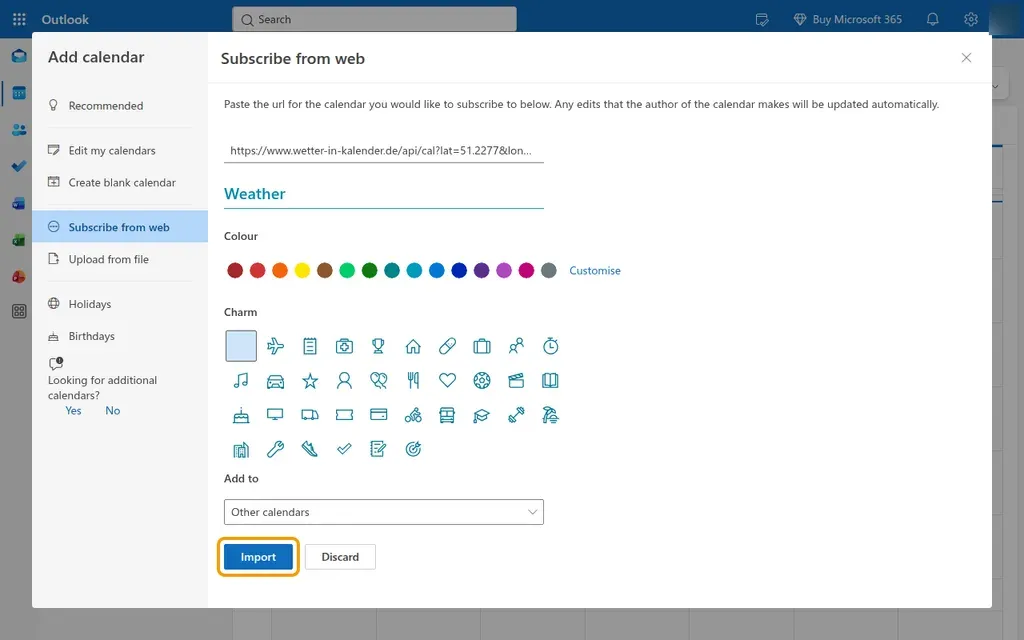
- Click Add calendar on the left.
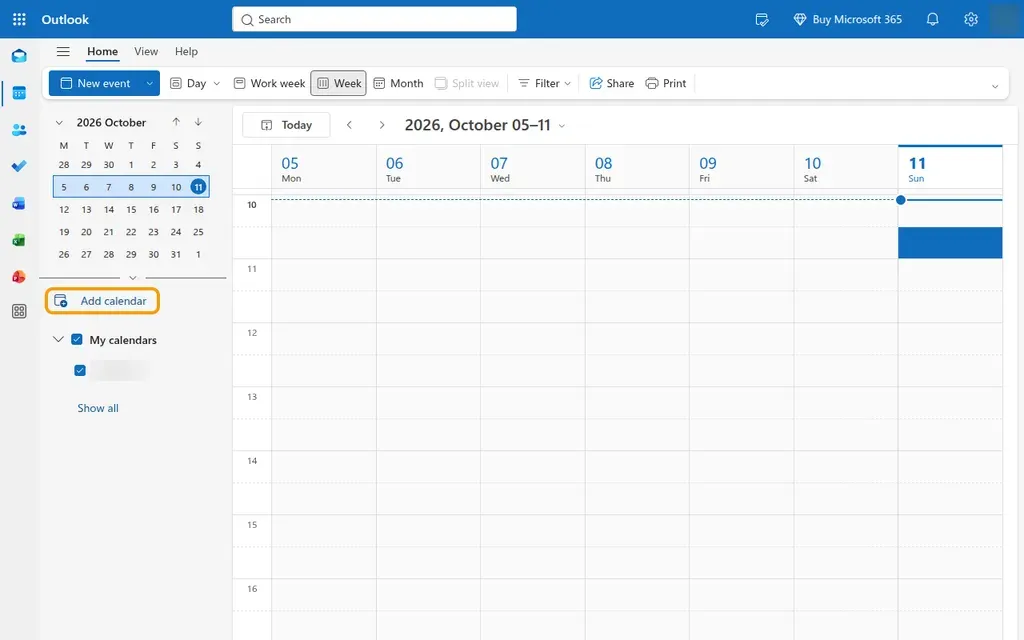
- Choose Subscribe from web, paste the link and give the calendar a name such as “Weather”.
- Click Import. Done.
Classic Outlook for Windows
- Copy your link in step 1 above with the Copy link button.
- Choose File and open the account settings.
- Open the Internet Calendars tab and click New.
- Paste the link and confirm the two windows that follow.
- 💡 In classic Outlook, do not just click the link. Outlook then only makes a copy that never updates.
- 💡 Outlook fetches new data every few hours. Sometimes it takes longer than a day.
- 💡 If you use a personal Outlook.com account, this link opens the window for adding a calendar directly.
Android
Google Calendar on Android
- Subscribe to the weather calendar once on your computer, as described above under Google Calendar.
- Open the Google Calendar app. The weather calendar appears by itself after a short time.
- You don’t see the weather? Tap the menu ☰ at the top left and Settings at the very bottom.
- Only a few calendars are listed under your Google account. Tap Show more there, then the weather calendar.
- Turn on Sync. Shortly after, the weather shows up in the app.
- 💡 Samsung Calendar also shows your Google calendars if your Google account is connected on the phone.
Frequently asked questions
How often is the weather in the calendar updated?
The forecast behind the link is recalculated every hour. How often your calendar app fetches it depends on the app. Apple Calendar and Outlook usually fetch new data several times a day, Google Calendar often only every 8 to 24 hours.
Why does Google Calendar show old weather?
Google refreshes subscribed calendars on its own schedule, and you cannot speed this up. If an up-to-date forecast matters to you, subscribe to the link in Apple Calendar or Outlook. New data arrives there much more often.
How do I remove the weather calendar?
In Google Calendar, open the settings, choose the weather calendar and unsubscribe there. On the iPhone, open the list of calendars in the Calendar app, open the info for the weather calendar and delete it. In Outlook, remove the calendar with a right-click.
Where does the weather data come from?
From the Deutscher Wetterdienst (DWD), Germany’s national weather service. The forecast comes from the DWD model MOSMIX and reaches about 10 days ahead. We load the data through the free service BrightSky.
Does it cost anything, or do I need an account?
No. The weather calendar is free. You need no account and no app, just the link.
What data is in the calendar link?
Only the coordinates of your place, the place name, the weather data you chose and the language. The link contains no personal data.
Does it work for places outside Germany?
No. The forecast comes from the German national weather service, so the search only finds places in Germany. It works well for border regions, holidays and trips within Germany.